
Introduction to the Project
Hello everyone,
Like many of us, WolfTeam was one of the games I spent the most time playing in my childhood. However, as the years passed, the game's old clients, server files, and technical documents unfortunately disappeared into the depths of the internet.
Recently, I stumbled upon this old video on YouTube. The guy in the video managed to somehow run a very old (2007) version of WolfTeam and reached the server list. Seeing this reignited my desire to tinker, and I started researching the topic deeply.
My research led me straight to the "[Source] WolfTeam Private Server (Incomplete)" thread opened by TheDeathX on this forum. Although the wtserver-master project shared in that thread is incomplete and abandoned, it proved something very important to me: Someone managed to get this structure working in the past!
With the motivation this gave me, I decided to start my own adventure.
My first task was to dig up old clients, leaked server files, and resources shared years ago that were left scattered around. I saw that between 2013 and 2017, various private server projects were actually developed, and some source codes even surfaced. But unfortunately, times have changed; forum links are broken, file-sharing sites are closed, and all those valuable archives have become trash.
The oldest version we could find and access was the WolfTeam TR September 2012 Version 20 client (unfortunately, we couldn't find the 2007 version seen in the video anywhere). It was impossible to find anything older than 2012 or a perfectly working server infrastructure on the internet.
That's why we decided to build the rest of the project entirely on this 2012 client version we have and the wtserver-master skeleton. We ran the whole process from scratch over these binaries.
Tools and methods we used:
Step by Step: What Have We Done?
Step 1 — Finding the Server Emulator and Basic Configuration
There are no server files available on the internet for this client version. As a result of our research, we found wtserver-master as the project offering the closest structure to WolfTeam. However, this project was largely incomplete and untested; even if a connection was established, the server crashed instantly.
Basic structure of the project:
In the first stage, when the server started, the WTServer.main() function ran and closed immediately. The reason for this was that the original code lacked an infinite loop. We fixed it like this:
This keeps the server running. 
Step 2 — Initial Problems Encountered with NyxLauncher
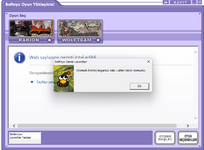
When we ran the launcher, it tried to connect to Joygame's own servers; since the servers were no longer online, download errors occurred:
"This file cannot be downloaded. Please try again later. > nyxlauncher.xfs"
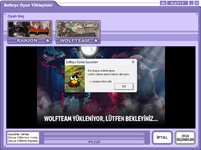
"Automatic download failed. Please try again."
Step 3 — Making Username/Password Entry Work in NyxLauncher
Obstacle 1: NyxLauncherEnc.xfs
The launcher's configuration file NyxLauncherEnc.xfs is stored in an encrypted XFS format. When we tried to edit this file directly, the launcher failed the CRC check and closed silently. It was also not possible to change the Joygame auth URL via NyxLauncher.ini.
Solution: When we examined the launcher at runtime with x32dbg, we discovered that the _!!DEBUG!!_ parameter found in the game client is also accepted by NyxLauncher.exe. With this parameter:
Bash:
Now the launcher interface opens, the username/password fields can be filled, and the 'Start Game' button works:
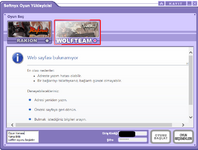
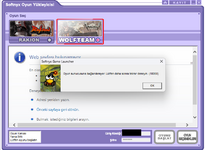
However, we encountered a new error when trying to start it — it couldn't connect to the server because the IP configuration hadn't been done yet:
"Cannot connect to the game server. Please try again later. (10060)"
Step 4 — DNS Redirections
To redirect the connection requests the game made to Joygame servers to WampServer, we edited the Windows hosts file:
Step 5 — XIGNCODE / Avital Security Module Bypass
When trying to start the game, a new error popped up:
file update failure from server side [11071,0,0,0] DF:update.u
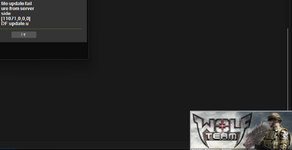
Analysis: When we examined the WampServer access logs, we saw that the security module made a HEAD request to the following address:
Because the file didn't exist, it returned 404 Not Found and the module closed the game.
Solution: We put the update.u file (462 bytes) found inside the original client files into WampServer:
The security module now receives this file with 200 OK.
Step 6 — IP Binding and setup_ip.bat
This step was one of the most critical technical parts of the project.
The Problem: When we examined the Wolfteam.exe and server.dll binaries with x32dbg, we detected that the client used hardcoded IP addresses within the binary to connect to the Broker server. These IPs belonged to the game's old official servers in Turkey and no longer existed.
The client can be redirected to a different IP with a debug parameter, but in the second stage (when the server list arrives), the game tries to connect to the IP that comes with the WorldListAck packet. This IP was also hardcoded in the binary.
Solution: Assigning these IPs to our own network adapter as a virtual alias. This way, while the client thinks it's connecting to the 'official server', it's actually reaching the wtserver on our own machine.
To automate this, we wrote the setup_ip.bat and remove_ip.bat files:
setup_ip.bat — Run as administrator, it does the following:
remove_ip.bat — Cleans up the IP aliases when the game ends:
This way, the client connects to our own machine during the gaming session, and the network configuration is cleaned up after the game is closed.
Step 7 — WorldListAck: Embedding the Server IP in Binary Format
The WorldListAck.java file generates the 'server list' packet that the Broker sends to the client. This packet tells the client which Game Server to connect to. The IP address is embedded in the packet as a 32-bit little-endian integer.
The original code sent a wrong IP or none at all. We calculated the correct IP and added it:
With this fix, the client is now directed to the correct server.
Step 8 — Database and PHP API Layer
We created a MySQL database named wolfteam on WampServer.
Tables:
The Java code of wtserver sends HTTP GET requests to localhost/wolfteam/users.php for user authentication and channels.php for the channel list. We wrote these PHP files from scratch.
Step 9 — From the T_10060 Error to Staying In-Game: The Critical Stage
This step was the part we put the most effort into.
Initial situation: The game opened, and we reached the server list screen. The server list loaded, but as soon as we clicked, this error appeared:
Disconnected from the server. T_10060
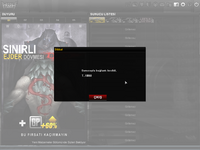
What does T_10060 mean? This error code is WSAETIMEDOUT in Windows — meaning connection timeout. The client is trying to establish a TCP connection to the Game Server (port 40707) but gets no response.
Why was it not getting a response?
There were two main problems:
1. EOFException in Client.java's infinite loop:
The startRecieving() function in Client.java exited the loop and closed the connection when it encountered an error while reading the packet. Parsing failed when encrypted packets arrived:
2. dataSize was hardcoded as exactly 16:
This line forces every packet to be read as 16 bytes; when actual packets arrived in different sizes, an EOFException occurred.
Fixes we made:
We fixed the packet reading loop in Client.java to also cover encrypted packets. When a malformed packet size arrives, it continues instead of breaking the loop, keeping the connection alive.
We matched the IP and port info in WorldListAck.java with the virtual IP we assigned via setup_ip.bat.
Result: After these fixes:
Current view — banner images load, we can stay in the game, but all channels are "Girilemez" (Unenterable):
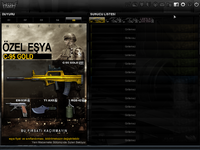
Step 10 — Binary Analysis: Understanding Packet Encryption (x32dbg + Python)
The reason channels appear as "Girilemez" (Unenterable) on the server list is packet encryption. When the client connects to the Broker, it sends encrypted packets; because the server cannot decrypt them, it cannot reply properly.
What we did with x32dbg:
What we did with Python:
Raw packet data we caught on the server console:
The actual msgId is probably 4352 (CS_BR_WORLDLIST_REQ) or 4354 (CS_BR_CHAINLIST_REQ) — but we couldn't find the Blowfish key.
Current Status Summary
What We Need From You
Open Source Commitment
Actually, I thought this process would be shorter, but the help I received and the friends I consulted told me that this is a very heavy process. I will continue for at least 1-2 more months. Whether successful or not, I will upload everything to GitHub. Maybe someone else will pick it up from where we left off and make it better in the future.
Thanks in advance for your help.
Hello everyone,
Like many of us, WolfTeam was one of the games I spent the most time playing in my childhood. However, as the years passed, the game's old clients, server files, and technical documents unfortunately disappeared into the depths of the internet.
Recently, I stumbled upon this old video on YouTube. The guy in the video managed to somehow run a very old (2007) version of WolfTeam and reached the server list. Seeing this reignited my desire to tinker, and I started researching the topic deeply.
My research led me straight to the "[Source] WolfTeam Private Server (Incomplete)" thread opened by TheDeathX on this forum. Although the wtserver-master project shared in that thread is incomplete and abandoned, it proved something very important to me: Someone managed to get this structure working in the past!
With the motivation this gave me, I decided to start my own adventure.
My first task was to dig up old clients, leaked server files, and resources shared years ago that were left scattered around. I saw that between 2013 and 2017, various private server projects were actually developed, and some source codes even surfaced. But unfortunately, times have changed; forum links are broken, file-sharing sites are closed, and all those valuable archives have become trash.
The oldest version we could find and access was the WolfTeam TR September 2012 Version 20 client (unfortunately, we couldn't find the 2007 version seen in the video anywhere). It was impossible to find anything older than 2012 or a perfectly working server infrastructure on the internet.
That's why we decided to build the rest of the project entirely on this 2012 client version we have and the wtserver-master skeleton. We ran the whole process from scratch over these binaries.
Tools and methods we used:
- x32dbg for binary analysis and runtime debugging
- Python for binary scanning, packet analysis, and brute-force scripts
- AI-supported analysis — We heavily utilized Gemini Ultra and Claude Code Pro models during coding, reverse engineering interpretation, and solution generation processes
- External technical consulting from knowledgeable individuals
| Component | Detail |
|---|---|
| Client | WolfTeam TR — 2012 September (Version 20, the oldest version available on the internet) |
| Server Base | wtserver-master (Java, Mateo-M — incomplete/unpatched) |
| Web Server | WampServer (Apache + PHP + MySQL) |
| Analysis Tools | x32dbg, Python (pycryptodome, struct, zlib) |
| AI Models | Gemini Ultra, Claude Code Pro |
Step by Step: What Have We Done?
Step 1 — Finding the Server Emulator and Basic Configuration
There are no server files available on the internet for this client version. As a result of our research, we found wtserver-master as the project offering the closest structure to WolfTeam. However, this project was largely incomplete and untested; even if a connection was established, the server crashed instantly.
Basic structure of the project:
- BrokerServer.java → The server list service the client connects to first (port 30706)
- GameServer.java → Channel and in-game packet management (port 40707)
- WorldListAck.java → Packet containing the server list; sends channel IPs to the client
- WorldInfoAck.java → Packet containing in-channel info (channel name, capacity)
In the first stage, when the server started, the WTServer.main() function ran and closed immediately. The reason for this was that the original code lacked an infinite loop. We fixed it like this:
Java:
// WTServer.java — Infinite loop to keep the server alive
while (true) {
    try {
        Thread.sleep(60000);
    } catch (InterruptedException ex) {
        break;
    }
}Step 2 — Initial Problems Encountered with NyxLauncher
When we ran the launcher, it tried to connect to Joygame's own servers; since the servers were no longer online, download errors occurred:
"This file cannot be downloaded. Please try again later. > nyxlauncher.xfs"
"Automatic download failed. Please try again."
Step 3 — Making Username/Password Entry Work in NyxLauncher
Obstacle 1: NyxLauncherEnc.xfs
The launcher's configuration file NyxLauncherEnc.xfs is stored in an encrypted XFS format. When we tried to edit this file directly, the launcher failed the CRC check and closed silently. It was also not possible to change the Joygame auth URL via NyxLauncher.ini.
Solution: When we examined the launcher at runtime with x32dbg, we discovered that the _!!DEBUG!!_ parameter found in the game client is also accepted by NyxLauncher.exe. With this parameter:
Bash:
Bash:
start NyxLauncher.exe _!!DEBUG!!_ [BROKER_IP] [PORT] [USERNAME] [PASSWORD]Now the launcher interface opens, the username/password fields can be filled, and the 'Start Game' button works:
However, we encountered a new error when trying to start it — it couldn't connect to the server because the IP configuration hadn't been done yet:
"Cannot connect to the game server. Please try again later. (10060)"
Step 4 — DNS Redirections
To redirect the connection requests the game made to Joygame servers to WampServer, we edited the Windows hosts file:
Kod:
127.0.0.1   cdn.joygamedl.com
127.0.0.1   www.joygame.com
127.0.0.1   joygame.com
127.0.0.1   joy.ac
127.0.0.1 fetch.joygame.comWhen trying to start the game, a new error popped up:
file update failure from server side [11071,0,0,0] DF:update.u
Analysis: When we examined the WampServer access logs, we saw that the security module made a HEAD request to the following address:
Kod:
HEAD /apex/wolfteam/psserver/web/update.u HTTP/1.1Solution: We put the update.u file (462 bytes) found inside the original client files into WampServer:
Kod:
C:\wamp64\www\apex\wolfteam\psserver\web\update.uStep 6 — IP Binding and setup_ip.bat
This step was one of the most critical technical parts of the project.
The Problem: When we examined the Wolfteam.exe and server.dll binaries with x32dbg, we detected that the client used hardcoded IP addresses within the binary to connect to the Broker server. These IPs belonged to the game's old official servers in Turkey and no longer existed.
The client can be redirected to a different IP with a debug parameter, but in the second stage (when the server list arrives), the game tries to connect to the IP that comes with the WorldListAck packet. This IP was also hardcoded in the binary.
Solution: Assigning these IPs to our own network adapter as a virtual alias. This way, while the client thinks it's connecting to the 'official server', it's actually reaching the wtserver on our own machine.
To automate this, we wrote the setup_ip.bat and remove_ip.bat files:
setup_ip.bat — Run as administrator, it does the following:
- Auto-detects the active network adapter
- Adds the required IP addresses to that adapter with a /32 prefix
- Creates the HKLM\Software\Wow6432Node\Softnyx\WolfTeamTS key in the Windows Registry and sets the Location and Version values (the game reads its installation directory and version number from this registry key)
Kod:
# PowerShell block inside setup_ip.bat (summary)
New-NetIPAddress -IPAddress [SERVER_IP_1] -PrefixLength 32 -InterfaceAlias $alias
New-NetIPAddress -IPAddress [SERVER_IP_2] -PrefixLength 32 -InterfaceAlias $alias

# Creating Registry key
$regPath = 'HKLM:\Software\Wow6432Node\Softnyx\WolfTeamTS'
Set-ItemProperty -Path $regPath -Name 'Location' -Value 'C:\...\wolf'
Set-ItemProperty -Path $regPath -Name 'Version'  -Value 20
remove_ip.bat — Cleans up the IP aliases when the game ends:
Kod:
Remove-NetIPAddress -IPAddress [SERVER_IP_1] -Confirm:$false
Remove-NetIPAddress -IPAddress [SERVER_IP_2] -Confirm:$falseStep 7 — WorldListAck: Embedding the Server IP in Binary Format
The WorldListAck.java file generates the 'server list' packet that the Broker sends to the client. This packet tells the client which Game Server to connect to. The IP address is embedded in the packet as a 32-bit little-endian integer.
The original code sent a wrong IP or none at all. We calculated the correct IP and added it:
Kod:
// WorldListAck.java — IP address as a little-endian 32-bit integer
// Example: IP = A.B.C.D → 0xDDCCBBAA
addInteger(0xD444290B); // The little-endian equivalent of our virtual IP address
addByte((byte) 0x9F);   // World number
addByte((byte) 0x03);   // Server type (3 = open)
addByte((byte) 0x03);   // ...
addByte((byte) 0x02);   // Current player count
addByte((byte) 0x00);
addByte((byte) 0xF4);   // Capacity (500)
addByte((byte) 0x01);Step 8 — Database and PHP API Layer
We created a MySQL database named wolfteam on WampServer.
Tables:
- users — username, password (MD5 hash), callsign, level, GP, WCoin, gold
- channels — channel name, port
- items — inventory items
- equips — equipment slots
The Java code of wtserver sends HTTP GET requests to localhost/wolfteam/users.php for user authentication and channels.php for the channel list. We wrote these PHP files from scratch.
Step 9 — From the T_10060 Error to Staying In-Game: The Critical Stage
This step was the part we put the most effort into.
Initial situation: The game opened, and we reached the server list screen. The server list loaded, but as soon as we clicked, this error appeared:
Disconnected from the server. T_10060
What does T_10060 mean? This error code is WSAETIMEDOUT in Windows — meaning connection timeout. The client is trying to establish a TCP connection to the Game Server (port 40707) but gets no response.
Why was it not getting a response?
There were two main problems:
1. EOFException in Client.java's infinite loop:
The startRecieving() function in Client.java exited the loop and closed the connection when it encountered an error while reading the packet. Parsing failed when encrypted packets arrived:
Kod:
// Problematic part — disconnects when an error occurs
try {
    in.readFully(recv_buffer, 0, dataSize);
} catch (Exception e) {
    System.out.println(e);
    break; // ← this break severs the connection
}
Kod:
dataSize = 16; // ← This line forces all packets to be read as 16 bytesFixes we made:
We fixed the packet reading loop in Client.java to also cover encrypted packets. When a malformed packet size arrives, it continues instead of breaking the loop, keeping the connection alive.
We matched the IP and port info in WorldListAck.java with the virtual IP we assigned via setup_ip.bat.
Result: After these fixes:
- Game opens
- Server list loads
- T_10060 error disappeared
- We can stay on the server list screen without errors
Current view — banner images load, we can stay in the game, but all channels are "Girilemez" (Unenterable):
Step 10 — Binary Analysis: Understanding Packet Encryption (x32dbg + Python)
The reason channels appear as "Girilemez" (Unenterable) on the server list is packet encryption. When the client connects to the Broker, it sends encrypted packets; because the server cannot decrypt them, it cannot reply properly.
What we did with x32dbg:
- Examined the server.dll and ServerDir.dll modules via process attach
- Placed breakpoints on send() / recv() / WSASend() / WSARecv() Windows APIs
- Detected the signature bytes of the Blowfish encryption algorithm's P-array constants (0x243F6A88, 0x85A308D3, ...) within the binary
- Factory_Create_IServerDirectory_Titan
- WS_AuthSession_EncryptFailure / WS_AuthSession_DecryptFailure
- AVCryptTransform, AVAuthSession
What we did with Python:
- Extracted ~8,500 ASCII/Unicode strings from server.dll and ServerDir.dll
- Tested all these strings as Blowfish ECB keys
- Tried all possible key lengths (between 4–56 bytes) with a 1-byte shift across the 512 bytes near the Blowfish P-array constants in the binary
- Performed mathematical cryptanalysis (LCG seed analysis, XOR pattern detection)
Raw packet data we caught on the server console:
Kod:
Client Connected
Received message ID: 20166  ← WRONG — being read from encrypted header
HEADER bytes: 47 C6 4E 51 84 AF D3 D1
PAYLOAD:      AA 46 F6 B1 0E D9 42 75 0D 90 32 2B 43 A6 34 1B
java.io.EOFExceptionCurrent Status Summary
| Step | Status |
|---|---|
| Server (WTServer) is running | |
| Game opens | |
| NyxLauncher username/password entry | |
| XIGNCODE / Avital bypass | |
| DNS redirections | |
| IP alias configuration (setup_ip.bat) | |
| Registry keys | |
| WorldListAck IP fix | |
| T_10060 error resolved | |
| Staying in-game without errors | |
| Server list loads | |
| Channels are "Unenterable" — packet encryption |  |
| Can enter a channel | |
What We Need From You
- Old WolfTeam clients you have: If you have any installation file from 2007-2012 or older in your archive, please share it with us. With the infrastructure we've set up, we can easily test and run those versions too. Our current progress is at a very sufficient level to test different versions!
- Server files for old WolfTeam versions — any version between 2012–2015
- The Blowfish encryption key or bypass method for this client version
- Information on whether the _!!DEBUG!!_ parameter affects encryption
- Someone who successfully established a channel connection with wtserver — we are curious how you did it
- Any archived source, technical document, or forum post related to this version
Open Source Commitment
Actually, I thought this process would be shorter, but the help I received and the friends I consulted told me that this is a very heavy process. I will continue for at least 1-2 more months. Whether successful or not, I will upload everything to GitHub. Maybe someone else will pick it up from where we left off and make it better in the future.
Thanks in advance for your help.
HTML:
https://mega.nz/file/7y4j1YQB#sJ50df0dleo3UAyuJ_KRFZV3fQP1OLO6Ci8fiT6Vaes
Son düzenleme: